A second check on every treatment course
The claim scrubber checks each charge on its own: the right modifier, the payer’s rules, the CCI edits. It cannot tell you that a course of radiation is missing a week of 77427, that a device was billed at the wrong level, or that a charge was entered on the wrong patient’s course. CodePath does that. It audits a treatment course’s charges as a whole against a template of what that kind of course normally produces, and shows the practice:
- Missing treatments: codes the template expects that have not been captured. These may be charges someone forgot to enter.
- Unmatched service lines: codes that were captured but are not in the template. These may be codes entered by accident, at the wrong point in the course, or at the wrong level.
- How closely the course matches, for each code, each phase and the course as a whole, so a biller can see at a glance which courses need attention.
CodePath is built into Iridium Suite and works on the same treatment courses, charges and claims as the rest of the system.
Templates built from your own prescriptions
A CodePath template describes one of the practice’s common prescriptions, for example “Bone mets 3D, 10 to 15 fractions, no IGRT”. The best templates are built from the practice’s own billing history: which codes are billed for that kind of course, how many times, in what order and how far apart.
- Phases are the stages of the course: the new patient visit, physician orders, simulation, treatment planning, then treatment delivery.
- Treatments are the codes expected in each phase. A treatment can list alternatives, such as 99202 to 99205 for a new patient visit, where only one is expected. Codes that are billed together on the same date, such as a visit and its quality measure code, can be grouped.
- Counts say how many times a phase or a code is expected: once, a fixed number of times, or a range. A treatment phase is usually set to repeat once for each five fractions, because 77427 and 77336 are counted that way.
- Timing sets the usual time between phases and between codes in a phase, such as one day between fractions, or 77427 on the same day as the fifth fraction. Weekends are skipped.
- Bill type is global, professional or technical. A professional template expects modifier 26 where it applies, and adds it to the codes automatically, so a practice that bills more than one way keeps a template for each.
Templates can be copied, so a 20-fraction version of a course is a few changes to the 25-fraction one, not a new build. A template that is no longer used can be deactivated without affecting the courses it was assigned to.
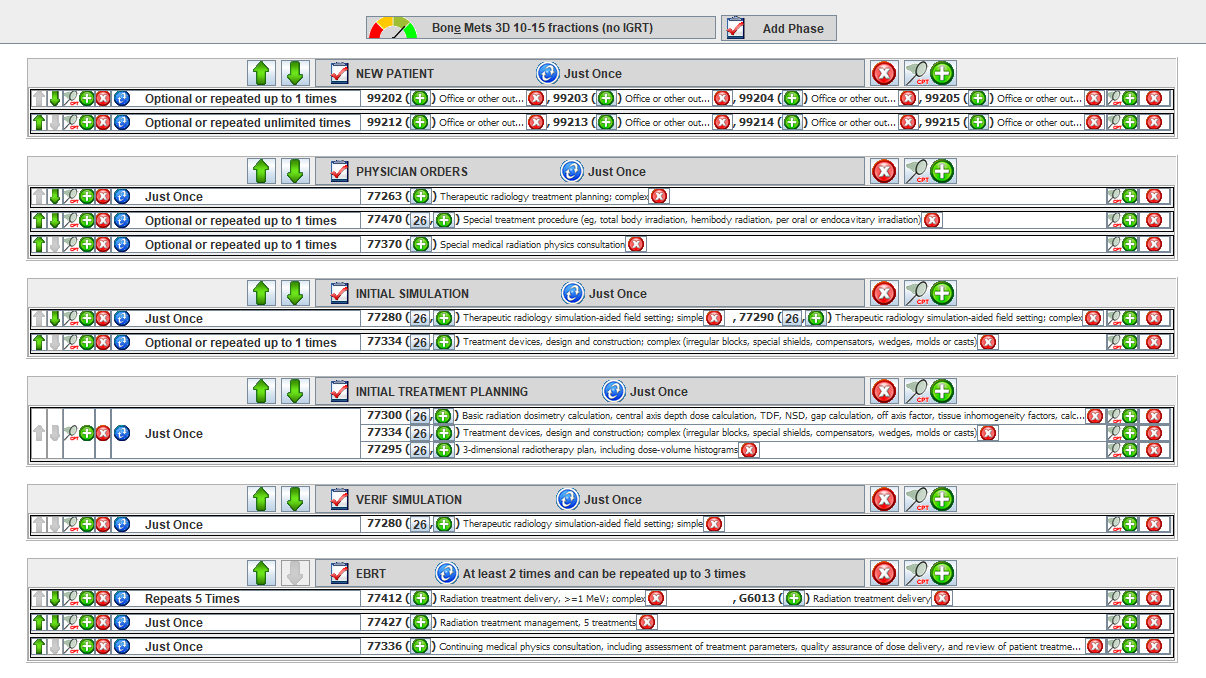
A template for a 3D bone metastases course: each phase lists the codes it expects and how often. Screens are from the release that introduced CodePath, so they show that year’s codes.
Assign it to the course and audit
The biller assigns a template to the patient’s treatment course, and the audit runs straight away. A course that is still under treatment can be audited up to the last treatment delivered, so the fractions that have not happened yet do not count against it.
Every expected code is shown next to the service line that matched it, with a match level of Perfect, Close, Bad or No Match and a value out of 10. The levels roll up to each interval, each phase and the whole course, along with a count of matched service lines and the course’s total score against its potential.
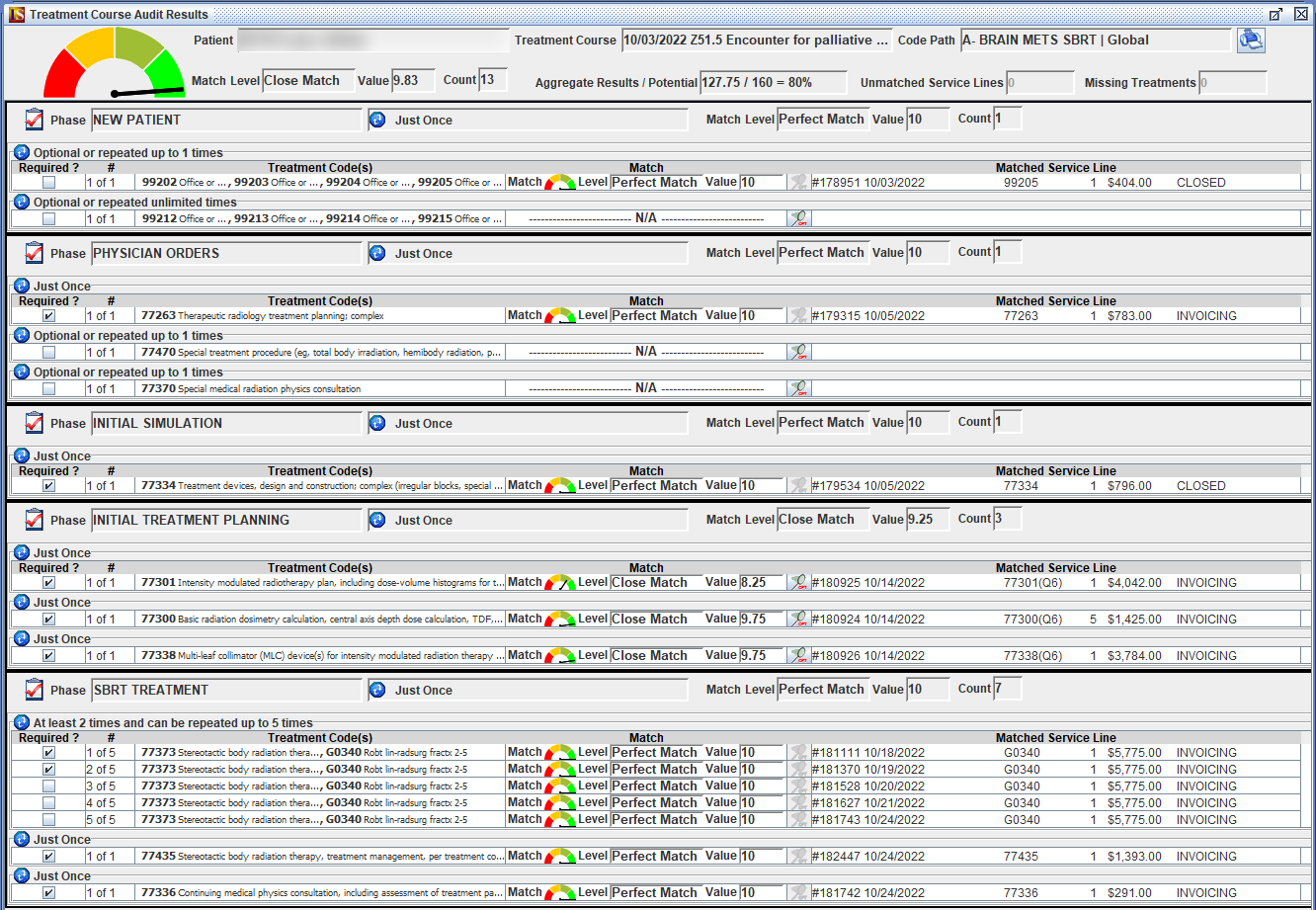
Audit results for an SBRT course: the gauge and match level for the course at the top, then each phase with the matched service lines. Demo data. Screens are from the release that introduced CodePath, so they show that year’s codes.
Audit during billing, not only at the end
A practice chooses when the audit runs:
- At any time, from the patient’s charge capture screen.
- At the end of treatment, automatically, when a course is completed.
- In the claims batch, before claims are generated. Each patient with a CodePath template shows a gauge with the course’s match level, and pointing at it shows the reason, such as the number of missing treatments. A course that has just started will show missing treatments for the fractions still to come; a course near the end should not.
Catching a missing or wrong charge before the claim goes out is a correction in charge capture. After the claim is invoiced it becomes a corrected claim under the payer’s rules.
Working the results
A low match level has one of four causes, and the audit screen shows which:
- A coding error or omission. An unmatched 77333 and a missing 77334 in the same phase usually mean one device billed at the wrong level. A second new patient visit code later in the course is usually an established patient visit coded wrong. The biller checks the medical record and corrects it. A charge that is genuinely missing can be captured from the audit screen, after the biller confirms the service was performed and the date of service is right.
- An unusual timeline. A patient treated urgently, or a course interrupted by illness or a holiday, will not follow the usual timing. The codes are right and the dates are right, so the biller notes it and moves on.
- The wrong template. A prostate patient prescribed a long IMRT course but assigned the template for a shorter course with a brachytherapy boost will show a poor match until the correct template is assigned. The same happens when a global course is assigned a professional template, because every 26 modifier it expects is missing.
- A template that needs adjusting. If courses that look normal keep scoring Bad Match in the same place, the template is probably wrong, not the billing. A common example: the template expects a few days between physician orders and simulation, but the practice usually simulates the same day. Changing that one timing setting and auditing again turns those lines into perfect matches. Timings should follow the typical course, not the outliers; a template loose enough to match everything stops finding anything.
Practice-level auditing and reports
The same audit runs across many courses at once. Filter by practice (for a group or a billing company working several), by template, by courses still under treatment or completed, and by completion date, and every course is listed with its match level, value, unmatched service lines and missing treatments.
The reports turn that into patterns: which codes are most often missing, which codes most often score a bad match, which codes are most often billed without matching the template, and which phases are missed. If one code shows up again and again as unmatched, the question is whether billers are entering it by mistake or at the wrong point in the course, and the answer is either training or a template change.
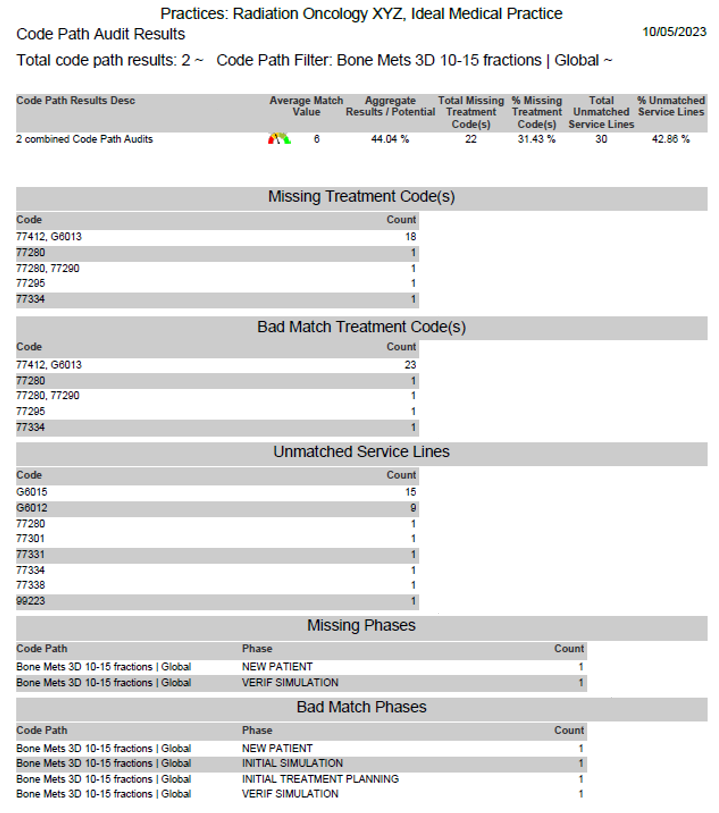
The analysis report for two courses on the same template, with the missing, bad-match and unmatched codes counted. Demo data. Screens are from the release that introduced CodePath, so they show that year’s codes.
The audit also records the timeline of each course, from the first visit to the start of treatment, which some practices use to measure how long it takes to get a patient under treatment.
Example: a 20-fraction prostate IMRT course in 2026
An illustration of how a template is set up, not billing advice for a specific patient. The codes follow the 2026 rules explained in our Medical Billing Terms articles; your payers’ policies and the physician’s documentation decide the final codes.
The course. Prostate IMRT, one isocenter, daily cone beam CT, 20 fractions, freestanding center, global billing.
| Phase | Expected codes | Count |
|---|---|---|
| New patient | 99202 to 99205, one of them | Optional, up to 1 |
| Physician orders | 77263 | Once |
| Treatment planning | 77301, 77338 and 77334 | Once each |
| Treatment, repeats 4 times | 77407, one day apart | 5 per interval |
| 77387-26, same day as each 77407 | 5 per interval | |
| 77427, same day as the fifth fraction | Once per interval | |
| 77336, same day as the 77427 | Once per interval |
The planning phase carries no simulation code, because simulation is included in 77301 for an IMRT plan. Image guidance is professional-only in every setting since January 1, 2026, so it carries modifier 26 even on a global template.
What the audit would show on this course:
- A week without 77427. Interval 3 has five 77407 lines but no 77427. It shows as a missing treatment, and interval 3 drops below a perfect match. The physician’s management note for that week is checked and the charge is captured.
- A 2025 code. A charge that arrives from the treatment system as 77385 does not match the template, so it shows as an unmatched service line, and the 77407 it should have been shows as missing. The claim scrubber also stops a deleted code on its own; CodePath shows where in the course it happened.
- A holiday. Fractions on Wednesday and the following Monday break the one-day timing. That fraction scores a close match, not a bad one, and the biller can see the dates are right.
Who relies on it
- Billing teams use it to confirm every expected charge for a course was captured once, at the right level and on the right dates, before the claims go out.
- Physicians use it to confirm the course was delivered and documented as prescribed.
- Practice management uses the practice-level reports to measure coding accuracy, find recurring errors and track how long patients wait for treatment.
Frequently asked
What does CodePath compare a treatment course against?
A CodePath template built for one of your common prescriptions, such as a 3D bone metastases course or a prostate IMRT course. The template lists the phases of the course, the codes expected in each phase, how many times each is expected, the bill type, and the usual time between steps.
What do the match levels mean?
Each code, interval, phase and the course as a whole is rated Perfect Match, Close Match, Bad Match or No Match, with a value out of 10. A Close Match usually means a timing difference, such as a gap over a holiday. A Bad or No Match points to a missing or wrong code, a misassigned template or a template that needs adjusting.
When does the audit run?
Whenever a biller opens it on a treatment course, automatically when a course is completed if the practice turns on the end-of-treatment audit, and in the claims batch before claims are generated if the practice turns on the batch audit.
Does CodePath change charges by itself?
No. The template is a billing guide, and the billing must reflect the medical record. A biller can capture a missing charge from the audit screen, but only after confirming that the service was performed and the date is right.